

Approaching the end of window 10 and have no plans on upgrading to 11.
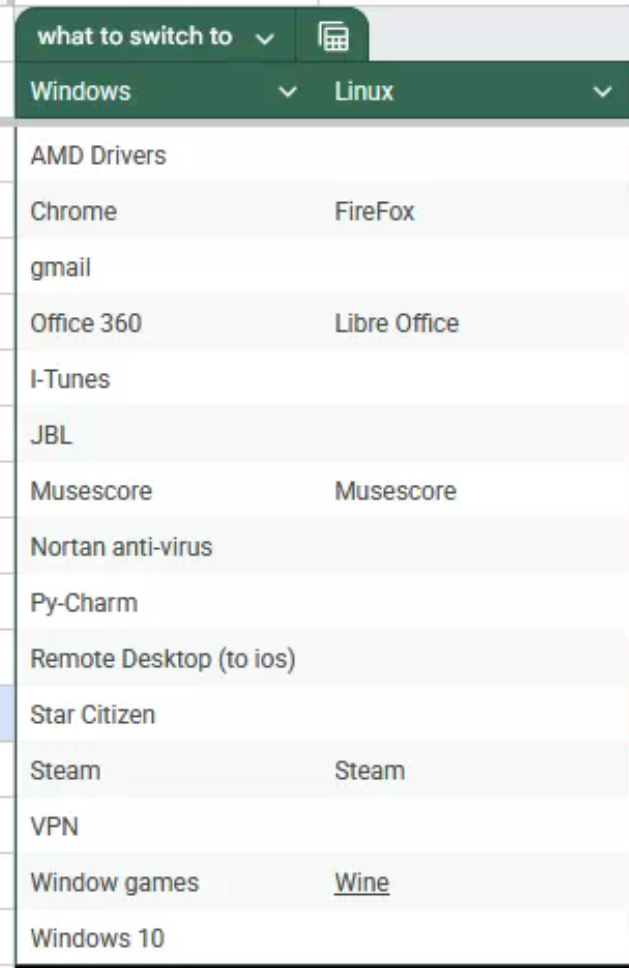
I am trying to find alternatives to applications I regularly use before jumping ship (it is mostly a gaming focused pc) any suggestions?
There’s oculus software for my vr but don’t know what I’m going to do with that
Small update: probably going to do Linux mint as that appears to be the most beginner friendly
Update two: that’s a lot of comments, and Thanks for all the info
If a tool (or distro) works well for you, it’s a good option. Everyone has different opinions on the “best” distro, but since it’s very subjective, there is no single “best” distro. There’s only 2 distros I recommend against, that’s Ubuntu (and close spin-offs) and Manjaro, because they have major objective downsides compared to equivalents like Mint or Endeavour. The distros I generally recommend to new users are Mint and Fedora, but feel free to look around, you’re not forced to pick a specific one.
You noted you were likely going to choose Linux Mint, great! It’s a “stable” distro, as in, it doesn’t change much with small updates. Instead, new release versions (23, 24, 25, etc) come with new changes. Linux Mint comes with an App Store that can install from Flathub, which should be the first place to check for installing new applications.
As for VR, it depends heavily on which exact headset you have, and is not always a great experience on Linux right now (speaking from experience with an Index). The LVRA wiki is a great starting place: https://lvra.gitlab.io/. If you’re on a Quest, WiVRN and ALVR exist, though they both have their own downsides. If you’re on a PCVR headset from Oculus, your options are more limited. You might also want to consider a different distro, as VR development is moving very fast. Many VR users choose to go with a “harder” rolling release distribution, like EndeavourOS, to receive feature updates quicker.
Also of note, if you have the storage space, you can choose to “dual boot” (even with just one drive). This will give you a menu to choose between Windows and Linux when starting your computer, and will give you time to move stuff over. I generally recommend this, as it provides an option to immediately do a task you know how to do on Windows, when it’s absolutely required to do the task asap.
deleted by creator